Weighted averages without denominator mistakes
A 10-point quiz and a 100-point exam should not automatically count equally. For weighted averages, I check what each weight represents first: possible points, course allocations or group sizes. The choice changes the denominator and the answer.
Weighted averages start with value-and-weight pairs
A weighted mean multiplies each value by its weight, adds the products and divides by the total weight. Pairing matters: the first weight belongs to the first value, the second to the second, and so on. Sorting the values separately from the weights breaks that pairing. The average calculator preserves the order you enter and checks that both lists have the same length.
Weights describe contribution, not units of the final result. If your values are percentages, the weighted mean is a percentage. If your values are measurements in centimetres, it remains in centimetres. Weights can represent frequencies, credit hours or explicit allocations. Do not mix these interpretations within one calculation unless you can explain the resulting quantity.
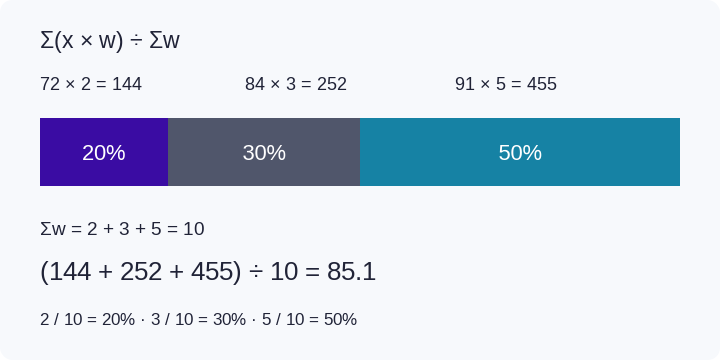
For values 72, 84 and 91 with weights 2, 3 and 5, the products are 144, 252 and 455. Their total is 851. The weights total 10, so the weighted mean is 851 / 10 = 85.1. An ordinary average uses a denominator of 3 and produces approximately 82.3333333333. The larger weight on 91 explains the difference.
Build a checkable working table
| Value | Weight | Product |
|---|---|---|
| 72 | 2 | 144 |
| 84 | 3 | 252 |
| 91 | 5 | 455 |
| Total | 10 | 851 |
I use a small table like this before entering a long weighted list. It catches misplaced weights, a missing row and an incorrect denominator more quickly than inspecting a single answer. Once the pattern is clear, paste the complete values and weights into their separate fields. Then compare the displayed weighted result with your small control example.
In this interface, weights must be nonnegative and at least one must be positive. An all-zero list has no valid denominator. Negative weights are rejected because the tool is designed for ordinary contribution weights, not algebraic coefficients. A zero weight is allowed, but it contributes nothing to the weighted mean.
Percentages need their original bases
Consider hypothetical results of 90% on a 10-point quiz and 60% on a 100-point exam. The earned points are 0.90 × 10 = 9 and 0.60 × 100 = 60. Add earned points and possible points separately: 69 / 110 × 100 = 62.7272727273%. Averaging 90 and 60 directly gives 75%, which treats the two assessments as equally important.
To reproduce the points-based result, enter values 90 and 60 with weights 10 and 100. The weighted numerator is 6900 and the denominator is 110. That calculation works because the values are percentages and the weights are their corresponding possible points. Do not enter earned points as the weights; that would create a different statistic.
A course can deliberately allocate equal or specified importance to assessments regardless of their point totals. In that case, use the published allocation weights, not the possible points. Arithmetic cannot decide the grading policy. Confirm which denominator the policy requires before you calculate a final score.
Combine group averages without losing the group sizes
A group mean represents a total divided by a group count. Multiplying the mean by its count reconstructs that group's total, subject to any rounding already applied. This is why group counts are the correct weights when combining disjoint groups of observations measured on the same scale.
Suppose one hypothetical group has 8 observations with mean 71 and another has 22 observations with mean 86. The implied totals are 8 × 71 = 568 and 22 × 86 = 1892. Together they total 2460 across 30 observations, giving 2460 / 30 = 82. The unweighted mean of 71 and 86 is 78.5 and answers a different question: the average of the two group summaries.
If the groups overlap, adding their counts may count some observations twice. If their means were rounded heavily, reconstructed totals will only be approximate. If they use different units or scoring scales, convert or reconcile those scales first. A correct weighted formula cannot repair an inconsistent definition of the underlying observations.
Weights do not need to add to 100
Multiplying every weight by the same positive factor leaves a weighted mean unchanged. The numerator and denominator both gain that factor, which cancels in the division. Weights 2, 3, 5 and weights 20, 30, 50 therefore produce the same 85.1 result for values 72, 84, 91. Decimal allocations 0.2, 0.3, 0.5 also express the same proportions.
That property does not mean you should ignore a grading policy's stated total. If you enter only completed components, the calculator divides by the sum of those entered weights. It returns the normalized average of those components, not an automatic final-course result. Missing assessments and future components need an explicit policy decision before they become numbers.
- Decide whether weights represent counts or explicit allocations.
- Match every weight to its value.
- Confirm that missing components have been handled intentionally.
- Check the total weight and the substituted formula.
- Record the interpretation with the exported result.
Read the other statistics as unweighted summaries
The calculator adds a separate weighted mean when you provide weights. Its median, mode, range, geometric mean, harmonic mean, RMS and standard deviations still describe the original list of values without weights. A zero-weight value remains in those summaries. This distinction is especially visible if a large value has weight zero.
For values 3 and 100 with weights 1 and 0, the weighted mean is 3. The ordinary mean is 51.5 and the unweighted median is also 51.5. These are not conflicting answers: they describe different contributions. Read mean versus median if you need to explain the centre of a list rather than its weighted contribution.
Exporting to CSV preserves the original value-and-weight pairs along with the summary. Labels follow the selected language, while numeric cells use decimal points. Calculation and local history stay on your device; clear history on a shared computer. Keep a separate copy if you need a durable record, because browser storage can be unavailable or cleared.
Common questions
Which weights combine group means?
Use the number of observations in each disjoint group, measured on the same scale. Previously rounded group means give an approximate combined result.
Do weights need to total 100?
No. The calculator divides by the actual weight total. Scaling all weights by the same positive factor leaves the weighted mean unchanged.
Does a zero weight remove a value from every result?
No. It excludes the value from the weighted mean only. The other statistics still summarize the full unweighted list.
Can I calculate a final grade from completed components?
The result is normalized over the weights you enter. A final grade requires the course policy for missing and unfinished components.